Earth Engine results in your own web map: four routes and their limits

You have an Earth Engine analysis and a MapLibre, Leaflet or OpenLayers application, and you want the result inside your map, not on a Google page. There are four realistic routes, and they differ less in code than in who authenticates, who pays per tile and what the terms let you keep.
We had no Earth Engine or Google Cloud credentials for this post. Everything below is either read from Google's documentation on 21 October 2026, or observed anonymously: response headers, a public Earth Engine App loaded in Playwright 1.58.2 (Chromium 145.0.7632.6) on an M1 Pro over home internet, and public sample tiles. The server example was written against the REST reference and the earthengine-api 1.7.49 source. We did not run it against a live project.
The four routes side by side
| 1. App in an iframe | 2. Live tiles from maps.create |
3. Export.map.toCloudStorage |
4. Map Tiles API (2D) | |
|---|---|---|---|---|
| What the browser shows | A Google-hosted page with its own Google Maps basemap | Your EE result as XYZ tiles in your map | Your EE result as static XYZ files | Google's roadmap or satellite basemap, not your result |
| Auth | None for public apps; Google sign-in for Group-restricted apps | Service account on your server; the tile URL itself acts as a token | None if objects are public; CORS set per bucket | API key plus a session token |
| Who pays | The app's Cloud project (EECU quota or bill) | Your project, online EECUs for every tile computed | Batch EECUs once, then Cloud Storage | Maps Platform 2D Map Tiles SKU |
| Caching | Not yours to control | Tiles came back private, max-age=3600 |
Your files; sample bucket served public, max-age=3600 |
Only as the Cache-Control and ETag headers allow |
| Lifetime | While the app is published | Map ID valid "a few hours" | Until you delete the objects | Session token about two weeks |
| Fits | Sharing a finished tool quickly | Results that change with parameters | A fixed result, many viewers | A Google basemap under routes 2 or 3 |
Route 1: an Earth Engine App in an iframe
Apps are published from the Code Editor and served at USERNAME.users.earthengine.app or PROJECT-ID.projects.earthengine.app. The Apps guide says viewers need no Earth Engine account, access can be public or limited to a single Google Group, and any assets the app reads must be shared publicly or with the app.
The guide does not mention iframes. So we checked the headers. google.earthengine.app/view/split-panel, /ocean, /forest-change and www.earthengine.app all returned no X-Frame-Options and no Content-Security-Policy. Framed inside a page served from http://127.0.0.1, the split-panel app rendered normally:
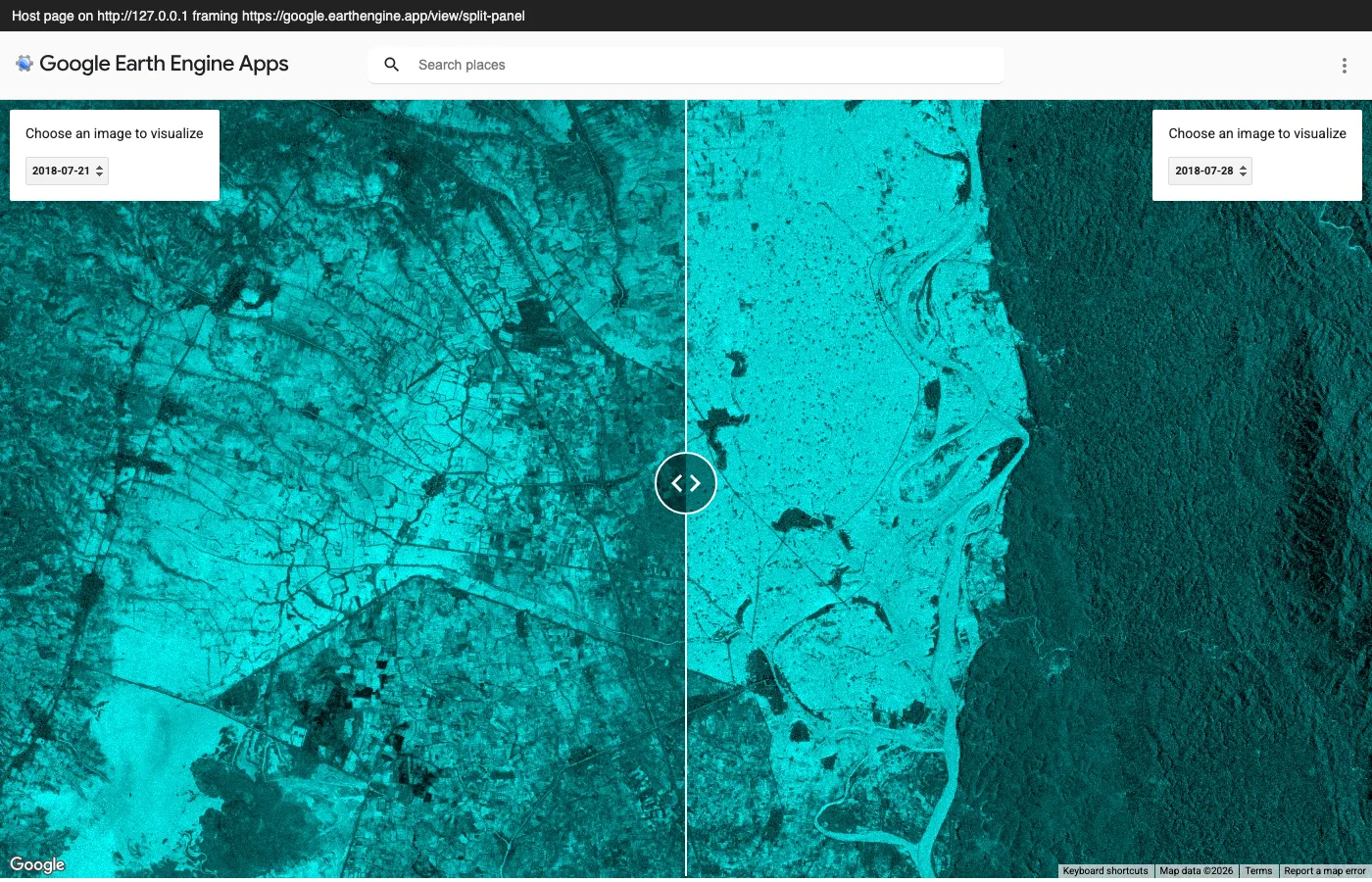
Screenshot of Google's public Split Panel app. Contains modified Copernicus Sentinel data (2018); basemap © Google.
Recording the app's traffic shows how a public app talks to Earth Engine. The page HTML carries a ya29. OAuth access token with authTokenExpiresInMs: 3599000, about an hour. The app then makes one authenticated GET .../algorithms and two POST https://content-earthengine.googleapis.com/v1/projects/earthengine-legacy/maps calls, one per panel, with a Bearer header. The 48 tile requests that follow go to earthengine.googleapis.com with no Authorization header at all. This matches the access-control guide: each app has its own service account, and for public apps earth-engine-public-apps@appspot.gserviceaccount.com holds Token Creator on it. Framed and top-level loads made the same calls.
The basemap is the Google Maps JavaScript API (v3.64, Google's key), and the app's script source is a public JSON file, as the Apps FAQ warns.
Billing follows the app's parent project. The noncommercial tiers page says app usage counts against that project, and apps slow down when it runs out of monthly quota. The pricing page lists apps among the online EECU consumers, so a commercial project pays per EECU-hour for app traffic. Apps are also not supported inside a VPC Service Controls perimeter.
Where it breaks: the app is a separate map. You cannot add its layer to your MapLibre style or swap its basemap. Iframe embedding is undocumented, so Google could add frame-ancestors tomorrow and your page would show a blank box. We did not test a Group-restricted app; it needs a Google sign-in, and third-party cookie blocking in a cross-site frame is a likely failure point.
Route 2: live tiles from maps.create
This is what getMapId does under the hood. projects.maps.create (also under projects.locations.maps) takes an EarthEngineMap body with expression, fileFormat, bandIds and visualizationOptions, needs the earthengine.maps.create permission and one of the earthengine, earthengine.readonly, cloud-platform or cloud-platform.read-only scopes, and returns a map name. The reference says the ID is valid for "a moderate period (a few hours)" and that JPEG or PNG output needs one or three bands, clipped to 0–255. Tiles come from projects.maps.tiles.get:
GET https://earthengine.googleapis.com/v1/{map name}/tiles/{zoom}/{x}/{y}
In earthengine-api 1.7.49, ee.data.getMapId builds exactly that as tile_fetcher.url_format, with {z}/{x}/{y} placeholders, so the string drops straight into a MapLibre, Leaflet or OpenLayers XYZ source.
What the tile endpoint did with the URL captured from the public app:
- The map name had the form
maps/<32 hex>-<32 hex>. Swapping in a fake ID returned401 Invalid token; dropping the second half returned a 500. The second half is the credential. - A plain
curlwith no credentials got a 256×256 JPEG withCache-Control: private, max-age=3600,Vary: Origin, andAccess-Control-Allow-Originechoing whateverOriginwe sent (https://example.org,http://127.0.0.1:8000). - The URL still served tiles 34 minutes after the app created it, when we stopped polling. We did not observe the expiry.
So the URL is a bearer token. Anyone who copies it from your page's network tab can render tiles on your project's EECUs until it expires. One caveat: the client library's docstring says url_format "will require authorization" when no API key is set. Our observation covers a map created by a public app's service account, and we could not test one created by our own service account.
Creating the map has to happen on a server. An anonymous POST to maps.create returned 401 CREDENTIALS_MISSING, and putting a service account key in the browser would hand out your project. Per the service account guide, the account needs the Earth Engine Resource Viewer role on a project that is registered for Earth Engine with the API enabled; the access-control guide adds Service Usage Consumer. The guide recommends Application Default Credentials over key files.
There is also a contract question. The Earth Engine section of the Google Cloud Service Specific Terms says: "Customer may not allow End Users of Customer's Applications to directly access or interact with the Google Earth Engine APIs unless those End Users have their own Google Cloud Platform Accounts." Whether a browser fetching earthengine.googleapis.com tile URLs counts is not something we can settle. A tile proxy on your server avoids the question, hides the map ID and lets you rate-limit. Ask your Google contact before relying on direct tile URLs in a commercial product.
Quota and cost: the usage page sets per-project defaults of 40 concurrent requests on the standard endpoint and 100 requests per second, with HTTP 429 and client backoff when exceeded. Commercially, online and batch EECU-hours cost $0.40 per hour up to 10,000 hours a month per billing account, $0.28 to 500,000 and $0.16 above, on the Limited plan or after the credits in Basic ($500 a month) and Professional ($2,000 a month). Noncommercial projects get 150 EECU-hours a month (Community), 1,000 (Contributor, billing account required but not charged) or 100,000 (Partner, by application); past the limit, work runs in a slower restricted mode. Google says these limits have been rolling out since 27 April 2026. The Earth Engine terms exclude selling a product or service, or charging for apps or data made with Earth Engine, from noncommercial use, so a paid product needs a commercial project.
The server
A minimal Flask endpoint. It caches the map ID for an hour, well inside "a few hours", and serves the JRC Global Surface Water occurrence band, whose catalog page asks for the attribution "Source: EC JRC/Google" on published maps.
import os
from datetime import datetime, timedelta, timezone

import ee
import google.auth
import requests
from flask import Flask, Response, jsonify

PROJECT = os.environ["EE_PROJECT"]   # Cloud project registered for Earth Engine
MAX_AGE = timedelta(hours=1)         # maps.create: IDs are valid "a few hours"

credentials, _ = google.auth.default(
    scopes=["https://www.googleapis.com/auth/earthengine"])
ee.Initialize(credentials, project=PROJECT)

app = Flask(__name__, static_folder="static", static_url_path="")
_current = {"tiles": None, "created": datetime.min.replace(tzinfo=timezone.utc)}


def create_map() -> str:
    water = ee.Image("JRC/GSW1_4/GlobalSurfaceWater").select("occurrence")
    vis = {"min": 0, "max": 100, "palette": ["ffffff", "ffbbbb", "0000ff"]}
    # One POST to https://earthengine.googleapis.com/v1/projects/PROJECT/maps
    return water.getMapId(vis)["tile_fetcher"].url_format


def current_template() -> str:
    now = datetime.now(timezone.utc)
    if now - _current["created"] > MAX_AGE:
        _current.update(tiles=create_map(), created=now)
    return _current["tiles"]


@app.get("/api/ee-tiles")
def ee_tiles():
    template = current_template()
    return jsonify(
        tiles=[template],
        attribution="Source: EC JRC/Google",
        expiresAt=(_current["created"] + MAX_AGE).isoformat(),
    )


# Optional: proxy tiles so the browser never sees the map ID.
# Point the client at request.host_url + "ee/{z}/{x}/{y}" instead.
@app.get("/ee/<int:z>/<int:x>/<int:y>")
def ee_tile(z, x, y):
    upstream = requests.get(current_template().format(z=z, x=x, y=y), timeout=30)
    return Response(
        upstream.content,
        status=upstream.status_code,
        content_type=upstream.headers.get("Content-Type"),
        headers={"Cache-Control": upstream.headers.get("Cache-Control", "private")},
    )


@app.get("/")
def index():
    return app.send_static_file("index.html")
To run it you need a Cloud project registered for Earth Engine with the API enabled, a service account with the roles above, ADC that resolve to it, pip install earthengine-api flask requests, and EE_PROJECT=my-project flask --app server run. With several workers you will create a few extra map IDs, which is harmless.
The MapLibre client
MapLibre GL JS 6 ships only as ES modules; the UMD maplibre-gl.js is gone, so v5-era snippets with a plain <script src> fail. static/index.html:
// <script type="module"> in static/index.html, with
// <link rel="stylesheet" href="https://cdn.jsdelivr.net/npm/maplibre-gl@6.13.0/dist/maplibre-gl.css">
import { Map } from 'https://cdn.jsdelivr.net/npm/maplibre-gl@6.13.0/dist/maplibre-gl.mjs';

const map = new Map({
  container: 'map',
  hash: true,                 // view in the URL: #zoom/lat/lng
  center: [90.3, 22.3],       // Ganges-Brahmaputra delta
  zoom: 7,
  style: {                    // replace with your own basemap style
    version: 8,
    sources: {},
    layers: [{ id: 'bg', type: 'background', paint: { 'background-color': '#e8e8e4' } }],
  },
});

async function loadEarthEngineLayer() {
  const res = await fetch('/api/ee-tiles');
  if (!res.ok) throw new Error(`tile endpoint returned ${res.status}`);
  const { tiles, attribution, expiresAt } = await res.json();

  const source = map.getSource('ee');
  if (source) {
    source.setTiles(tiles);   // swap in the fresh map ID, keep the layer
  } else {
    map.addSource('ee', { type: 'raster', tiles, tileSize: 256, attribution });
    map.addLayer({ id: 'ee', type: 'raster', source: 'ee' });
  }
  // Ask the server again when its cached map ID is due for renewal.
  const refreshIn = Math.max(60_000, Date.parse(expiresAt) - Date.now());
  setTimeout(() => loadEarthEngineLayer().catch(console.error), refreshIn);
}

map.on('load', () => loadEarthEngineLayer().catch(console.error));
We ran this page in Chromium against a stub /api/ee-tiles, a few lines of Node that returned the tile template captured from the public app. All 24 tile fetches returned 200 with the origin echoed back:
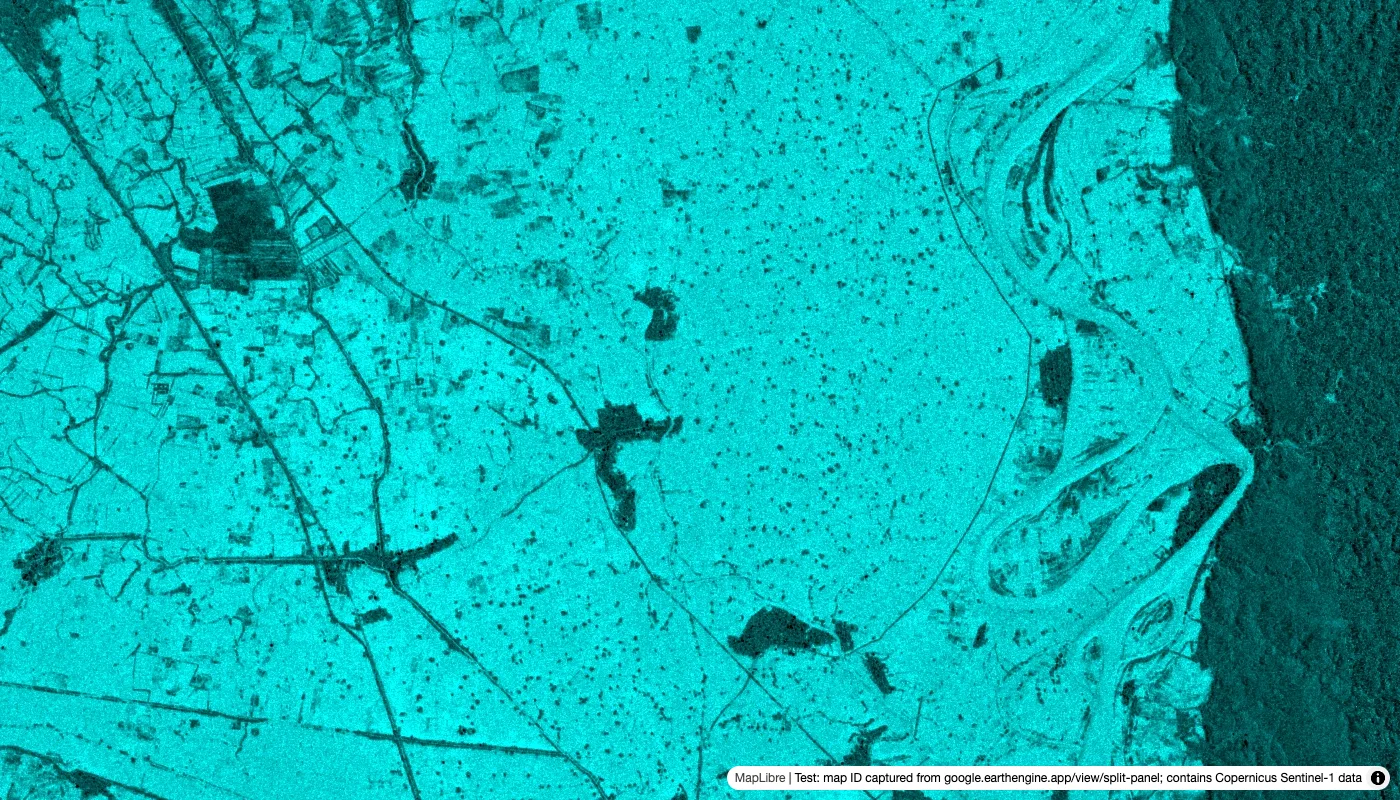
Tiles from the same public app's map ID. Contains modified Copernicus Sentinel data (2018).
Route 3: export the tiles once and serve files
Export.map.toCloudStorage writes a tile pyramid to a bucket you own. The parameters that matter: image (an Image, not a collection), bucket, path, maxZoom or scale, minZoom, region, fileFormat (auto writes opaque tiles as JPEG and transparent ones as PNG), skipEmptyTiles, writePublicTiles (default true; you must own the bucket) and bucketCorsUris, which sets CORS on the whole bucket, not the folder.
Google's public sample output is at storage.googleapis.com/ee-docs-demos/mapToCloudExample/. Its index.html was last modified on 31 January 2018 and covers 34–40°E, 3.0°S–1.0°N up to zoom 13. Tiles sit at {z}/{x}/{y} with no file extension. Tiles at zooms 0, 4 and 6 came back as PNG, and 8, 10 and 13 as JPEG, all with Cache-Control: public, max-age=3600. Requests outside the pyramid (zoom 14, or 6/0/0) got 403 AccessDenied, not 404, because anonymous listing is off. The bucket's CORS allows only https://earth.google.com; requests from example.org, 127.0.0.1, code.earthengine.google.com and google.earthengine.app got no Access-Control-Allow-Origin.
That last detail decides which client works. Same tiles, same page:
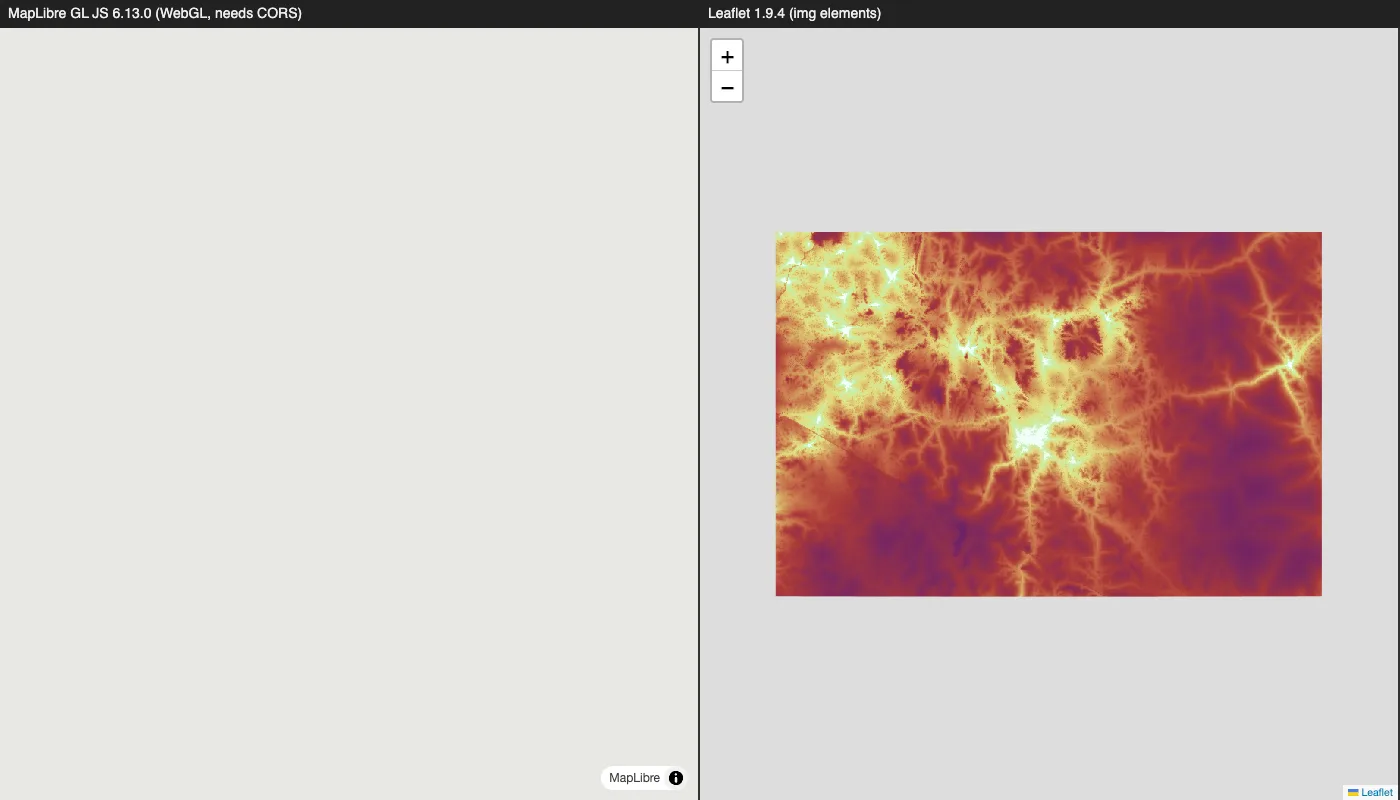
Tiles from Google's public Export.map.toCloudStorage sample bucket.
MapLibre fetched 16 tiles and every one failed with "blocked by CORS policy". WebGL can only upload images the page is allowed to read. Leaflet loaded 9 tiles as plain <img> elements, which need no CORS. We did not test OpenLayers. If you export for MapLibre, set bucketCorsUris to your site's origins; Google's guide warns that ['*'] lets third parties use your tiles at your egress cost. Also set bounds and maxzoom on the source so the map doesn't request tiles the export never wrote.
The cost is one batch export, billed at the same per-EECU-hour rates, plus Cloud Storage storage and egress, which the Apps FAQ reminds you are not free. After that, Earth Engine is out of the request path: no map IDs, no quota per viewer. The files are yours to put behind a CDN, though the dataset licence still applies. Route 3 is the wrong choice when users pick parameters or dates, when the input updates, or when the area is large and deep: each extra zoom level multiplies the tile count by four.
Route 4: the Map Tiles API is Google's basemap, not your result
The Map Tiles API serves Google Maps roadmap, satellite and terrain tiles, not Earth Engine output. You POST to https://tile.googleapis.com/v1/createSession?key=... with a mapType, get a session token valid for about two weeks, then request https://tile.googleapis.com/v1/2dtiles/{z}/{x}/{y}?session=...&key=.... A viewport request returns the copyright string you must display.
Pricing on the Maps Platform price list: the 2D Map Tiles SKU includes 100,000 free billable events a month, then $0.60 per 1,000 up to a million, falling to $0.045 above 50 million. Session and viewport requests are not billed. Default limits are 6,000 tile requests a minute and 15,000 a day per project, so a public map needs a quota increase early.
The Map Tiles API policies allow third-party renderers such as MapLibre, as long as the Google Maps logo and data attribution stay visible and unobscured. They also say you must not pre-fetch, index, store or cache content beyond what the response's Cache-Control and ETag allow, and you may not use the tiles for image analysis, object detection, geodata extraction or offline use. The Maps Platform terms (section 3.2.3) add no scraping, no creating content from Google Maps Content, including tracing the satellite layer or training ML models, and no use with non-Google maps. For projects billed to an address in the European Economic Area and created after 8 July 2025, satellite 2D tiles and Photorealistic 3D Tiles return 403.
"Google Earth" imagery is stricter still. Google's Geo Guidelines say "Google Earth may not be embedded online or in apps", allow only "a handful of static images, with proper attribution, for non-commercial purposes", and state that Satellite View imagery "falls under the same commercial restrictions as Google Earth." The high-resolution mosaic you see in Google Earth is not in the Earth Engine catalog. Earth Engine's own terms (section 4.2) put any Google Maps content shown inside Earth Engine under the Google Maps/Google Earth Additional Terms. The Landsat, Sentinel and JRC layers you compute on are separate datasets, each with its own licence and attribution line.
A legitimate combination is Map Tiles satellite as the basemap with your route 2 or 3 layer on top. The policies require the Google attribution to stay clearly tied to the basemap and separate from yours, such as "Source: EC JRC/Google". Copying Google tiles into your export bucket, or into a training set, is not allowed.
Choosing
If the result is fixed, export it (route 3) and keep Earth Engine out of the request path. If it depends on user input or fresh imagery, use live tiles (route 2) behind your own endpoint, and treat every tile as metered compute. If you need something on screen this week and don't need your own map, an app in an iframe works today, but it is undocumented. Use the Map Tiles API only for a Google basemap, under its caching rules.
Three things we could not test without credentials are worth checking in your own project before you commit to route 2: how long a map ID from your service account actually lives, whether its tile URL also works without an Authorization header, and how Google reads the "Incorporation into Applications" clause for browser-fetched tiles.
Sources
- Earth Engine Apps guide
- Earth Engine access guide and access control
- Service accounts with Earth Engine
- REST: projects.maps.create, projects.locations.maps.create, projects.maps.tiles.get
- Exporting map tiles
- Earth Engine quotas, noncommercial tiers, pricing, terms of service, noncommercial eligibility
- Google Cloud Service Specific Terms, section 5 (Earth Engine)
- JRC Global Surface Water v1.4 catalog entry
- Map Tiles API policies, usage and billing, session tokens, satellite tiles, EEA changes
- Google Maps Platform pricing and terms of service
- Google Geo Guidelines
- MapLibre GL JS changelog (6.0.0, ESM-only)